Claude Code on iPhone and Mobile: 5 Ways to Use It (2026)
Yes, you can use Claude Code from your iPhone. Claude Code still runs on your Mac. Your phone becomes its screen and keyboard.
There are five good ways to do it in 2026. Here is how each one works, what it costs and where it falls short.
| Way | Setup | Other agents (Codex) | Full Mac shell | SSH to your servers | Mac screen | Open ports | Price |
|---|---|---|---|---|---|---|---|
| Remote Control | One command | No | No, Claude only | No | No | None | Included with Claude plans |
| Happy | CLI and app | Yes, Codex | No | No | No | None | Free |
| Nimbalyst | Desktop and iOS app | Some | No | No | No | None | Free for individuals |
| SSH + tmux | Remote Login, keys, VPN or port | Yes | Yes | Yes | No | Port 22 or a VPN | App price |
| Macky | 2 minutes | Yes, Codex mode | Yes | Yes | Yes | None | Free, Pro $29 once |
1. Claude Remote Control: the official way
Anthropic built this into Claude Code. Run claude --remote-control in your project, or type /rc in a session that is already open. Then open the Code tab in the Claude app on iOS or Android and pick your session.
It works on Pro, Max, Team and Enterprise plans. Your code stays on your Mac. It can send a push notification when Claude needs your approval, which is handy.
It only covers that Claude session. You can't open a shell, run your own commands or reach other tools. If you close the terminal, the session goes offline. Our full Claude Code Remote Control guide covers setup and fixes.
2. Happy
Happy is a free, open source app for iPhone and Android. You install its CLI on your Mac and run happy in place of claude. Messages are end-to-end encrypted, and it can notify you when Claude is waiting. It works with Codex too.
Happy wraps the agent. You still don't get a normal terminal on your phone, and it can't show you the Mac's screen.
3. Nimbalyst
Nimbalyst is a desktop workspace for AI coding agents with a companion iOS app. You can watch and steer sessions from your phone. At the time of writing it is free for individuals. You bring your own Claude subscription or API key.
It is a whole new workspace to adopt. If you already like your terminal setup, that is a lot of change for a phone view.
4. SSH and tmux with Termius or Blink
This is the classic developer setup. Turn on Remote Login on your Mac, run Claude Code inside tmux, then connect from Termius or Blink. You get a real shell and can reattach any time.
Getting there takes work. You need port forwarding or a VPN like Tailscale to reach your Mac away from home, and your SSH keys have to live on the phone. See how to SSH into your Mac from iPhone.
5. Macky: your whole Mac on your iPhone
Macky gives your iPhone your Mac's own terminal. Claude Code runs exactly as it does at your desk. You see every line it prints and type into it directly.
Install Macky on your Mac and your iPhone, sign in on both, and connect. You don't open ports, copy SSH keys or set up a VPN. The connection goes straight between your devices and is end-to-end encrypted.
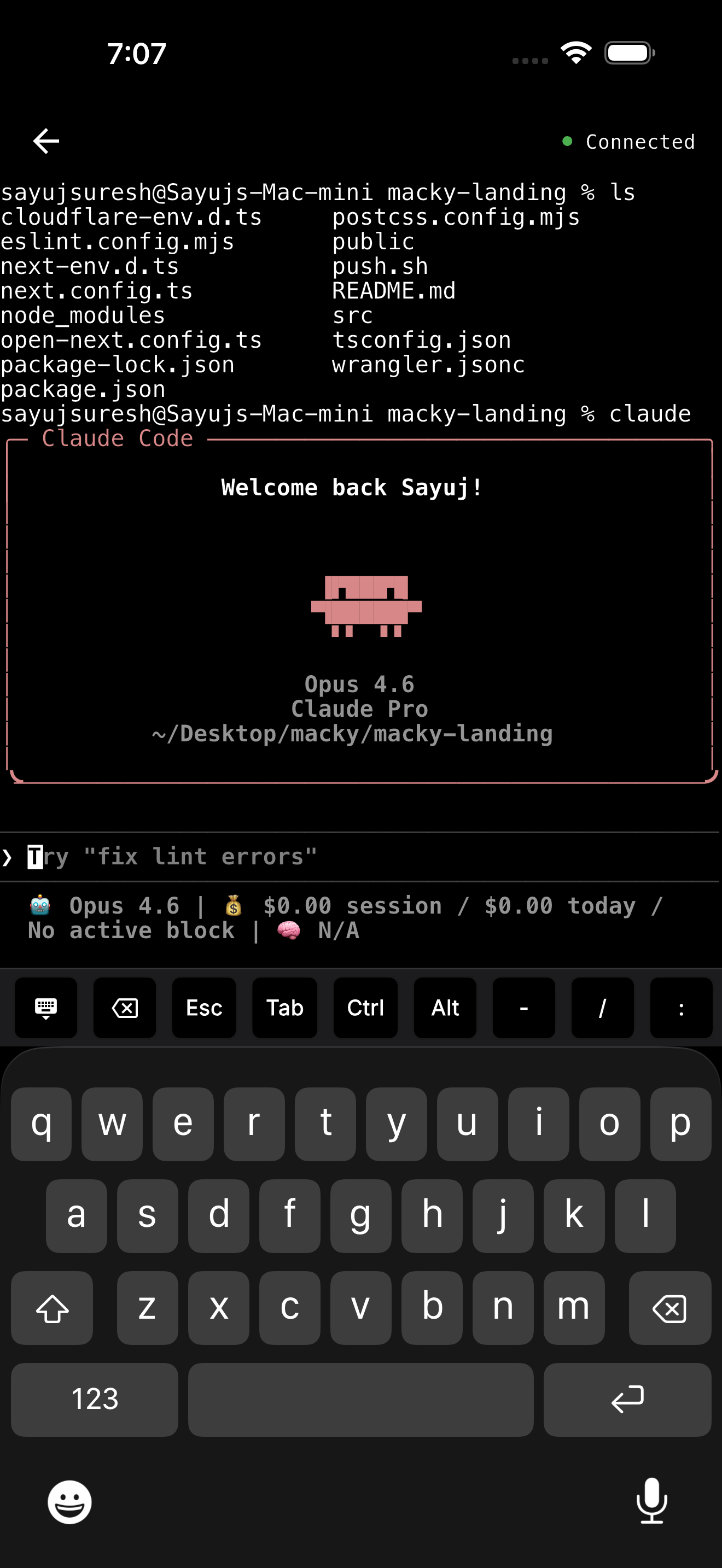
What you get
- Claude Code and Codex modes: open your agent in one tap.
- Key bar: Esc, Tab and Ctrl sit above the keyboard. Approve with y and Enter. Stop a run with Ctrl+C.
- The whole Mac: switch to a plain shell, run
ssh my-vpswith the keys already on your Mac, or open the full desktop. - Lid closed: with Pro, your MacBook can stay closed on the desk and keep working.
- Background connect: with Pro, your session stays connected in the background.
- Safe by default: every new device has to be approved on your Mac, and a master password protects the terminal.
Macky is free to try with 5 minute sessions. Pro is a one-time $29. Get it on the App Store.
How to run Claude Code from your iPhone with Macky
First, install Claude Code on your Mac:
curl -fsSL https://claude.ai/install.sh | bashOr with npm:
npm install -g @anthropic-ai/claude-code- Run
claudein your project and sign in with/login. Your Claude subscription works. - Install Macky on your Mac and your iPhone, then sign in on both.
- Tap your Mac to connect, open the Claude Code mode and give it a task.
- When Claude asks for approval, tap y and then Enter. To stop it, tap Ctrl and then C.
Use tmux for long tasks
For long jobs, start Claude Code inside tmux. If anything disconnects, the task keeps going and you can attach again.
tmux new -s claudeclaudeTo come back later:
tmux attach -t claudeKeep your Mac awake
Claude Code stops when your Mac sleeps. With Macky Pro you can use your MacBook with the lid closed. Without it, keep the lid open and run caffeinate -i in another tab while a task runs.
All the caffeinate options are in our caffeinate guide.
When this is useful
- On your commute: start a task before you leave and check it on the train.
- On the couch: keep work moving without opening the laptop.
- Overnight: start a big job before bed and check it in the morning.
Which one should you use?
- You only use Claude Code and want the official path: Remote Control.
- You want a free app with notifications: Happy.
- You want a new workspace built around agents: Nimbalyst.
- You already run SSH and tmux: Termius or Blink.
- You want your whole Mac in your pocket, with Claude Code, Codex, your servers and your screen: Macky.
Using Codex too? See how to use Codex from iPhone. Having connection trouble? Read Claude Code Remote Control not working.
FAQ
Can I use Claude Code on my iPhone?
Yes. Claude Code runs on your computer and your iPhone connects to it. You can use Anthropic's Remote Control, an app like Happy, SSH or Macky.
Is there an official Claude Code mobile app?
Claude Code lives in the Claude app for iOS and Android. Use the Code tab with Remote Control to steer a session running on your computer.
Does Claude Code run on the iPhone itself?
No. It needs a Mac or a Linux or Windows machine. Your phone only controls it.
Do I need an API key to use Claude Code from my phone?
No. A Claude Pro or Max subscription works. Remote Control actually requires a claude.ai login and does not work with API keys.
Can I approve Claude Code's changes from my phone?
Yes. Remote Control and Happy show approval prompts in their apps. In Macky you see the prompt in the terminal and tap y and Enter.
Will Claude Code keep running if I close my MacBook?
Only if the Mac stays awake. With Macky Pro you can use the Mac with the lid closed. Otherwise keep the lid open and run caffeinate.
Related Guides & Comparisons
Try Macky
Connect to your Mac terminal from your iPhone.