Parsec on Mac: Does It Work Well? Setup and Alternatives (2026)
Yes. Parsec runs on a Mac. You can use it to connect to other computers, and you can share your own Mac with it. It is fast on a good network and free for personal use.
There is one big gap. Parsec has no app for iPhone or iPad. If you want to reach your Mac from your phone, you need something else. Below is how to set Parsec up on a Mac, where it falls short, and the alternatives worth knowing.
What Parsec is good at
Parsec started as a tool for streaming games. Unity owns it now. It sends a live video of the host screen to your device with very little delay. That makes it great for games, video editing and design work over a fast connection.
You can connect from Windows, Mac, Linux, Android, or Chrome in a browser. The free plan covers personal use.
How to set up Parsec on a Mac
Connect from your Mac to another computer
- Download Parsec from parsec.app and move it to Applications.
- Open it and sign in. You need a free Parsec account.
- Pick a computer from your list and click Connect.
Share your Mac as a host
- Check your Mac. Parsec hosting needs macOS 10.15 or later, and Parsec recommends a Mac from 2019 or newer.
- Open Parsec, go to its settings and make sure hosting is on.
- macOS will ask for permissions. Allow Screen Recording and Accessibility in System Settings > Privacy & Security, then restart Parsec.
- On the other device, sign in with the same account and connect to your Mac.
Where Parsec falls short on a Mac
- No iPhone or iPad app. Parsec's own docs say iOS and iPadOS are not supported. That includes the web client in Safari. A community app called OpenParsec exists, but it is unofficial and not on the App Store.
- Some features cost extra. Virtual displays, extra monitors and 4:4:4 color come with the paid Warp plan.
- Everything is video. Even typing one command means streaming your whole screen. On mobile data or a weak signal, that uses a lot of data and can lag. We explain why in why screen streaming gets slow on 5G.
- No terminal mode. A quick
git pullstill means clicking around a remote desktop. - Macs with no monitor need care. A Mac with no display attached can stream at a low resolution. A dummy plug or Parsec's virtual display on Warp fixes it.
Parsec pricing
Parsec is free for personal use. Warp is the paid plan for individuals with a monthly subscription. Teams is for companies and is priced per user. Prices change, so check parsec.app before you pay.
Parsec alternatives for Mac
| App | iPhone app | Mac terminal | AI agent modes | Built for games | Price |
|---|---|---|---|---|---|
| Parsec | No | No | No | Yes | Free, Warp is monthly |
| Jump Desktop | Yes | No | No | No | Paid per platform |
| Screens 5 | Yes | No | No | No | Subscription or lifetime |
| Apple Screen Sharing | No | No | No | No | Free, built in |
| Chrome Remote Desktop | Yes | No | No | No | Free |
| Macky | Yes, iPhone and iPad | Yes | Claude Code and Codex | No | Free, Pro $29 once |
Jump Desktop
A polished remote desktop app with an iPhone app and its own fast protocol. A strong pick for full desktop work. You buy it for each platform. See Screens vs Jump Desktop.
Screens 5
Made for Macs, with apps for iPhone, iPad and Mac. It is based on VNC, so it can feel slower on mobile data.
Apple Screen Sharing
Built into macOS and free. Great from one Mac to another on the same network. There is no iPhone app, and reaching a Mac over the internet takes extra setup. More in Mac to Mac remote desktop.
Chrome Remote Desktop
Free, runs through Chrome and has an iPhone app. It is simple and basic, and it needs a Google account. See Chrome Remote Desktop on Mac.
To reach your Mac from your iPhone: Macky
Macky does a different job than Parsec. It is made for reaching your Mac from your iPhone or iPad. It is not for games.
Install Macky on your Mac and your iPhone, sign in on both, and connect. You get your Mac's real terminal and its full screen in one app. You don't open any ports. The connection goes straight between your devices and is end-to-end encrypted.
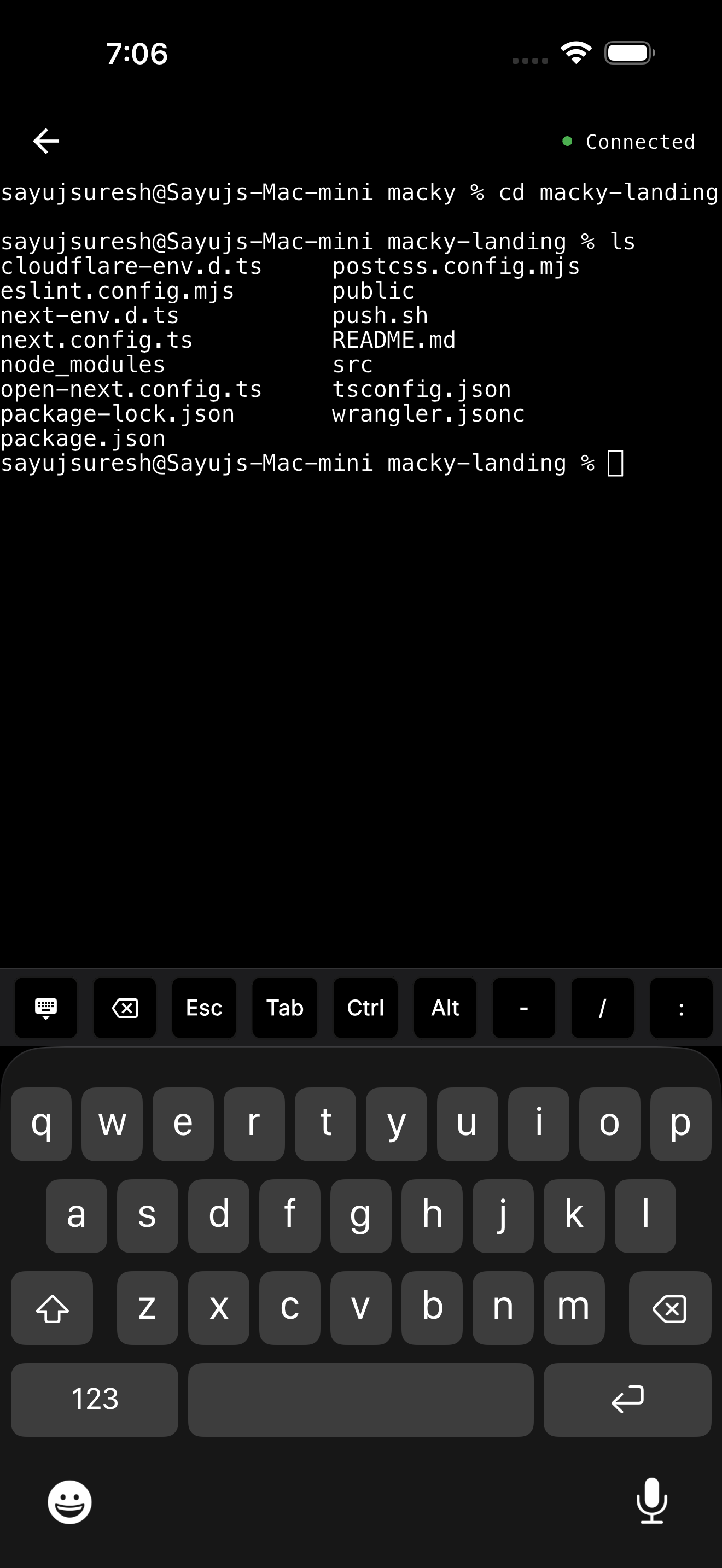
- Terminal mode: Run
git,npmordockerwithout streaming the whole screen. It stays light on 5G. - AI agents: Claude Code and Codex modes, with Esc, Tab and Ctrl on the key bar. Approve the next step with y and Enter.
- Your servers: Your SSH keys stay on your Mac. Type
ssh my-vpsand you're in. - Lid closed: With Pro, your MacBook can sit closed on the desk and you can still use it.
- Safe by default: Every new device has to be approved on your Mac, and a master password protects the terminal.
Macky is free to try with 5 minute sessions. Pro is a one-time $29. Get it on the App Store.
Which one should you use?
- Games or video editing on a fast network: Parsec.
- Mac to Mac at home: Apple Screen Sharing.
- A full desktop from an iPad or iPhone: Jump Desktop or Screens.
- Your Mac's terminal, AI agents and screen from your iPhone: Macky.
Want more options? See the best remote desktop apps for Mac and our RustDesk for Mac review.
FAQ
Does Parsec work on Mac?
Yes. You can connect from a Mac, and you can host from a Mac running macOS 10.15 or later.
Is Parsec free on Mac?
Yes, for personal use. The paid Warp plan adds extras like virtual displays and 4:4:4 color.
Is there a Parsec app for iPhone or iPad?
No. Parsec does not support iOS or iPadOS. That includes its web client in Safari.
What permissions does Parsec need on a Mac?
To host, allow Screen Recording and Accessibility for Parsec in System Settings > Privacy & Security.
Can I use Parsec on a Mac with no monitor?
Yes, but a Mac with no display may stream at a low resolution. A dummy plug or Parsec's virtual display on Warp helps.
What is the best Parsec alternative to control a Mac from an iPhone?
Jump Desktop and Screens give you the full desktop. Macky gives you the Mac's terminal and screen with no setup, plus Claude Code and Codex modes.
Related Guides & Comparisons
Try Macky
Connect to your Mac terminal from your iPhone.