Codex Mobile: How to Use OpenAI Codex from iPhone (2026)
Yes. Codex now works from your iPhone through the ChatGPT app. It can run tasks in OpenAI's cloud or on your own computer.
OpenAI added this in May 2026. Here is how to set it up, what it can do, where it stops, and what to use if you live in the Codex CLI.
How Codex on mobile works
Your iPhone sends the instructions. The work runs in the cloud or on a computer you paired with your phone. Nothing runs on the iPhone itself.
| ChatGPT app | SSH + tmux | Macky | |
|---|---|---|---|
| Codex app tasks | Yes | No | No |
| Codex CLI in your terminal | No | Yes | Yes |
| Claude Code and other agents | No | Yes | Yes |
| Full shell | No | Yes | Yes |
| Your SSH servers | No | Keys on the phone | Keys stay on your Mac |
| Mac screen | No | No | Yes |
| Setup | QR pairing | Ports or VPN, plus keys | About 2 minutes |
| Price | Depends on your ChatGPT plan | Varies by app | Free, Pro $29 once |
How to set up Codex on iPhone
- On your Mac or Windows PC, open the ChatGPT desktop app.
- Go to Settings > Connections > Control this Mac or PC and choose Set up. Approve remote access.
- Scan the QR code with your iPhone. Sign in to the same ChatGPT account and workspace, then approve the connection.
- In the ChatGPT app on your iPhone, open Codex and pick your computer.
Older versions of the app call this section Remote. If you can't find it at all, it may not be on for you yet. Availability depends on OpenAI's rollout and your workspace settings, so a work admin may need to turn it on.
What you can do from your phone
- Start a task in the cloud or on your connected computer.
- Follow progress and send new instructions.
- Approve commands before Codex runs them.
- Review changed files, diffs and test results.
- Switch between tasks on different computers.
For checking in on Codex away from your desk, it works well and costs nothing extra to set up.
The limits
- Your computer has to stay awake and online. If it sleeps, the task stops moving.
- It pairs with the ChatGPT desktop app. A Codex CLI session you started in Terminal stays separate.
- You get the Codex task view. There is no general terminal, so you can't run your own commands.
- It covers Codex only. Claude Code and other agents need their own apps.
If you use the Codex CLI
Many developers run codex in a terminal. Here are three ways to reach that from your phone.
1. Codex cloud tasks
Start a cloud task from the ChatGPT app and review the result later. It runs on OpenAI's machines, so it can't touch files that only live on your Mac.
2. SSH and tmux
Run codex inside tmux on your Mac, then connect with an SSH app like Termius or Blink. It works. Reaching a Mac at home takes Remote Login plus port forwarding or a VPN, and your SSH key has to be on the phone.
tmux new -s codex3. Macky
Macky opens your Mac's real terminal on your iPhone. It has a dedicated Codex mode, so the CLI you already use runs the same way it does at your desk.
You don't open ports or set up SSH. The connection goes straight between your devices and is end-to-end encrypted.
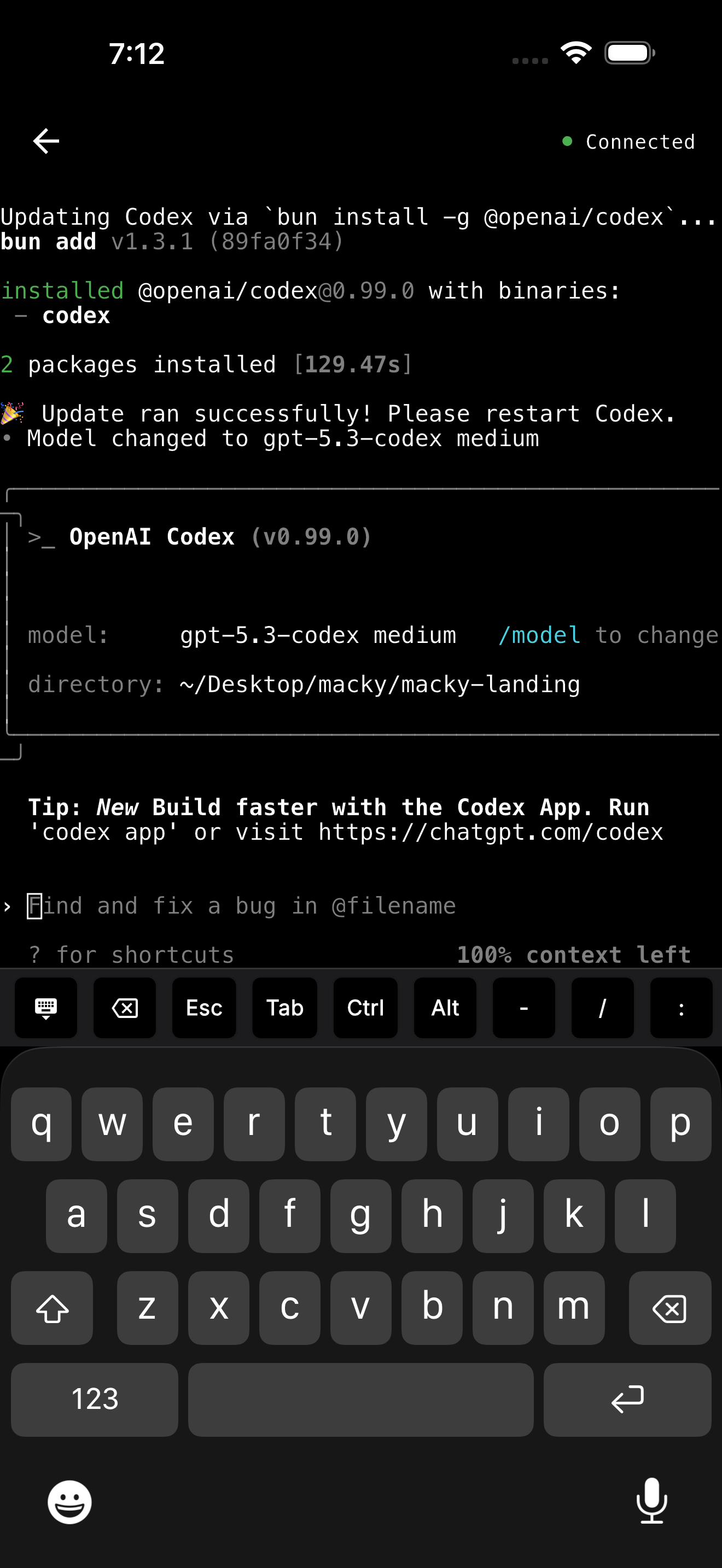
- Approve with one tap. y and Enter sit on the key bar next to Esc, Tab and Ctrl.
- Stop a run with Ctrl+C and give a new instruction.
- Use Claude Code in the same app, or any other tool in your shell.
- Reach your servers with ssh my-vps. Your keys stay on your Mac.
- Switch to your Mac's full screen when you need it.
- With Pro, you can use your MacBook with the lid closed, and background connect keeps the session ready.
Macky is free to try with 5 minute sessions. Pro is a one-time $29. Get it on the App Store.
Common problems
- The approval prompt never shows up on your phone.
- Pairing fails or the QR code won't connect.
- The task stops because the computer went to sleep.
We cover the fixes in Codex awaiting approval and pairing bugs.
Stuck while pairing? See Codex stuck on Waiting for desktop and Codex remote control errors on Mac.
Which should you use?
- You use the ChatGPT desktop app: Codex in the ChatGPT app. It is built for this.
- You want work done without your computer on: Codex cloud tasks.
- You run the Codex CLI on a Mac: Macky. Your terminal, your tools and your servers on your phone.
Using Claude Code too? See Claude Code on iPhone.
FAQ
Is there a Codex app for iPhone?
Yes. Codex lives inside the ChatGPT app for iPhone. Open Codex in the app to start or follow tasks.
Can I use the Codex CLI from my iPhone?
Not through the ChatGPT app, which pairs with the desktop app. To use the CLI from your phone, connect to your Mac's terminal with Macky or an SSH app.
Does my computer need to stay on?
Yes. For tasks on your own computer, it has to stay awake and online. Cloud tasks keep running without it.
Why can't I see Codex in the ChatGPT app?
It depends on OpenAI's rollout and your workspace settings. Update the app, and ask your admin if you use a work workspace.
Can I approve Codex commands from my phone?
Yes. The ChatGPT app shows approval requests. In Macky you answer CLI prompts with y and Enter from the key bar.
Can I use Codex and Claude Code in the same app?
Macky has modes for both, and both run in your Mac's real terminal.
Related Guides & Comparisons
Try Macky
Connect to your Mac terminal from your iPhone.