Splashtop for Mac: Pricing, Setup and Alternatives (2026)
Yes, Splashtop works well on Mac. You install the Splashtop Streamer on the Mac you want to reach, then connect from another computer, an iPhone or an iPad.
For one person, the main paid plan is Solo at $72 a year. Below is what each plan includes, how to set it up on macOS, where it falls short, and the alternatives worth a look.
Splashtop pricing for Mac users
Prices at the time of writing, from Splashtop's pricing page, billed yearly:
| Plan | Price | Who it is for | What you get |
|---|---|---|---|
| Personal | Free | Home use | Access on the same local network only. Access from anywhere is a paid add-on. |
| Solo | $72 per year | One person | Unattended access to up to 2 computers, file transfer, remote print |
| Pro | $99 per user per year | Individuals and small teams | Everything in Solo plus multi-monitor, chat, session recording and user roles |
| Performance | $149 per user per year | Creative work | Everything in Pro plus 4:4:4 color, up to 240 fps, high quality audio and USB passthrough |
| Enterprise | Custom quote | Companies | SSO, access controls, logging and APIs |
Every paid plan is a subscription. If you stop paying, you lose remote access.
How to set up Splashtop on a Mac
- Create a Splashtop account and start a plan or the free trial.
- Install the Splashtop Streamer on the Mac you want to control and sign in.
- Open System Settings, then Privacy and Security. Turn on Screen Recording and Accessibility for the Streamer. You have to do this on the Mac itself, you can't do it remotely.
- Install the Splashtop Business app on your iPhone, iPad or other computer and sign in with the same account.
- Tap your Mac in the list to connect.
If you skip Screen Recording you will see a black screen. If you skip Accessibility you can see the Mac but can't click or type.
Where Splashtop falls short on a Mac
- It is a yearly bill. $72 a year adds up to $216 over three years on Solo.
- Solo stops at 2 computers. A third Mac means moving up to Pro.
- It shows the screen only. To run a command you open Terminal inside the remote screen and type on a tiny window. On an iPhone that gets old fast.
- It is built for IT work. Roles, recording and SSO are great for a help desk. They add little if it is just you and your own Mac.
Splashtop alternatives for Mac
| App | Price model | iPhone app | Mac terminal view | Claude Code and Codex | Windows PCs |
|---|---|---|---|---|---|
| Splashtop Solo | $72 per year | Yes | No | No | Yes |
| Jump Desktop | One-time per platform | Yes | No | No | Yes |
| Screens 5 | Subscription or lifetime | Yes | No | No | Mac only |
| Chrome Remote Desktop | Free | Yes | No | No | Yes |
| Apple Screen Sharing | Free, built in | No | No | No | Mac only |
| Macky | Free, Pro $29 once | Yes | Yes | Yes | Mac only |
Jump Desktop
Fast and polished, with good support for many monitors. You pay once, but separately on each platform. It is a screen tool, so terminal work happens inside the remote desktop.
Screens 5
A well designed Mac and iPhone app built on VNC. It is great at home. Over cellular data the picture can lag, since it streams the whole screen.
Chrome Remote Desktop
Free and simple. You need a Google account and Chrome on the Mac. It has fewer features than paid tools.
Apple Screen Sharing
Free and already on your Mac. It works best on the same network. Reaching it from outside your home needs a VPN or an open port.
Macky: your Mac on your iPhone, terminal included
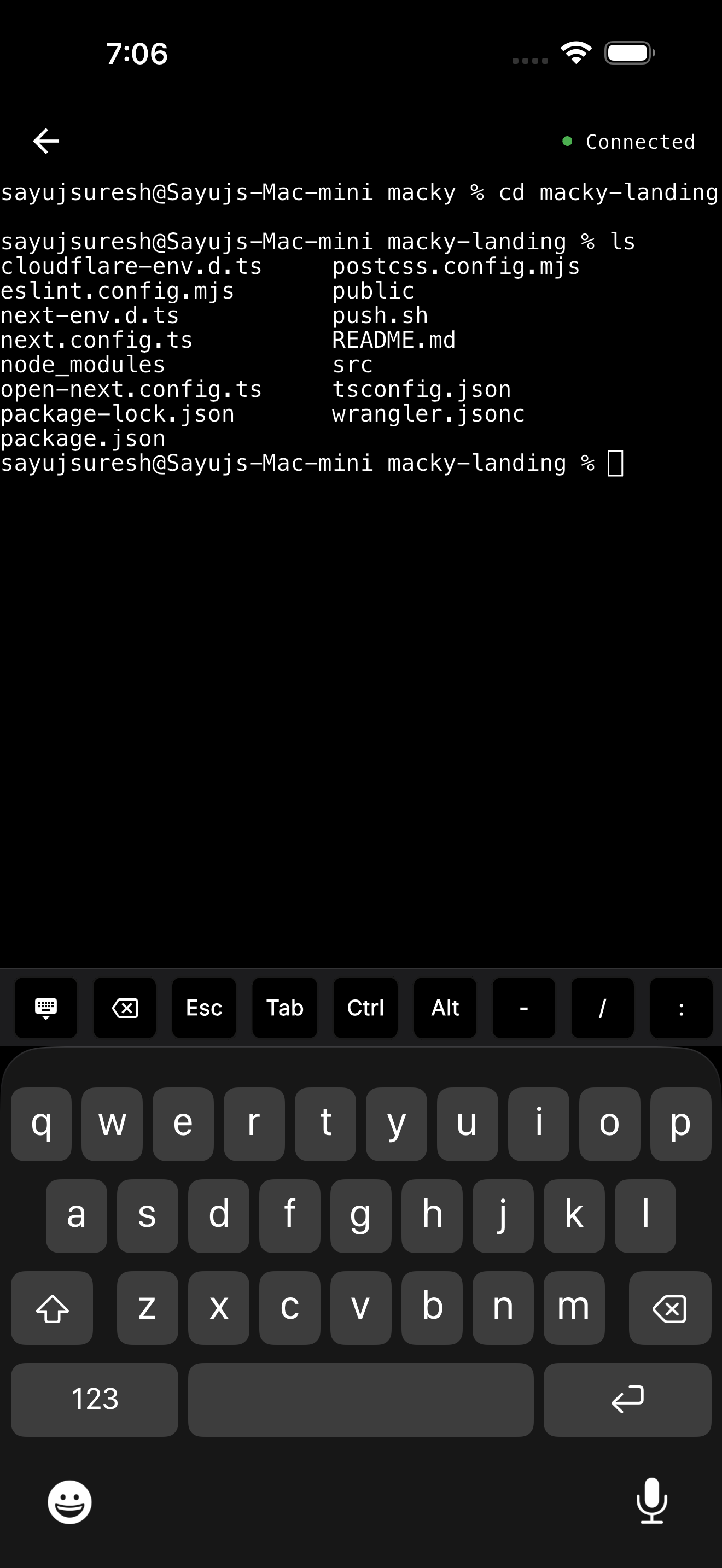
Macky connects your iPhone or iPad straight to your Mac. You get the full desktop when you need it and a real terminal when you want to type commands. The terminal is your Mac's own shell, so your tools and SSH keys are already there.
- One price. Free with 5 minute sessions. Pro is a one-time $29.
- Built for AI agents. Claude Code and Codex have their own modes. Approve with y and Enter on the key bar. Esc, Tab and Ctrl are one tap away.
- No setup. No ports and no VPN. It works on home Wi-Fi, office networks and 5G. The connection is end-to-end encrypted.
- Your servers too. Type
ssh my-vpsand it uses the keys on your Mac. - Lid closed. With Pro you can use your MacBook with the lid closed.
To be fair about the limits: Macky only connects to Macs, and the remote side is iPhone or iPad. It is made for one person with their own Mac. If you support a team or Windows PCs, Splashtop is the better fit. Get Macky on the App Store.
Which should you use?
- You support a team or Windows PCs: Splashtop Pro.
- You do creative work and need color and frame rate: Splashtop Performance.
- You want free and simple: Chrome Remote Desktop.
- You want your own Mac from your iPhone, terminal included: Macky.
More comparisons: best remote desktop for Mac, Chrome Remote Desktop on Mac, Parsec on Mac, Jump Desktop vs TeamViewer and Jump Desktop vs AnyDesk.
FAQ
Does Splashtop work on Mac?
Yes. Install the Splashtop Streamer on the Mac and allow Screen Recording and Accessibility. Then you can control it from an iPhone, iPad or another computer.
Is Splashtop free for Mac?
Splashtop Personal is free on the same local network. To use it from anywhere you need a paid add-on or a paid plan.
How much does Splashtop Solo cost?
At the time of writing it is $72 per year, billed yearly. It covers up to 2 computers.
Why is the screen black in Splashtop on Mac?
The Streamer usually lacks Screen Recording permission. Turn it on in System Settings under Privacy and Security.
Does Splashtop have an iPhone app?
Yes. The Splashtop Business app connects to your Mac from an iPhone or iPad.
Is there a cheaper alternative to Splashtop for Mac?
Chrome Remote Desktop is free. If you only need your own Mac from your iPhone, Macky is free to try and Pro is a one-time $29.
Related Guides & Comparisons
Try Macky
Connect to your Mac terminal from your iPhone.